A Complete Guide to Understanding React Hooks

I’m Arjun Saxena, a passionate software developer specializing in web engineering. I believe in writing code that creates real solutions to real problems. I love building efficient, user-friendly applications and constantly push myself to learn new technologies. Beyond coding, I enjoy sharing knowledge and growing together with others in the tech community.
Writing Cleaner, Smarter, and Reusable React Components
Before React Hooks, writing React code often meant:
Large class components 😓
Confusing lifecycle methods
Repeated logic
React Hooks changed everything.
In this blog, you’ll learn:
What React Hooks are and why they exist
How useState and useEffect work
How Hooks replace class lifecycle methods
When to use useCallback and useMemo
Simple real-world examples
Visual understanding of component flow
No advanced jargon — step by step clarity.
1️⃣ What Are React Hooks?
Simple Definition:
React Hooks are functions that let you use React features (like state and lifecycle) inside functional components.
Hooks allow you to:
✔ Use state
✔ Run side effects
✔ Reuse logic
✔ Avoid class components
Why Hooks Were Introduced?
Before Hooks:
State only worked in class components
Code was harder to reuse
Lifecycle methods were confusing
With Hooks:
👉 Functional components do everything 🎉
2️⃣ Why Are React Hooks Useful?
Hooks make React:
Easier to read
Easier to maintain
Easier to reuse logic
More beginner-friendly
👉 Less code, more clarity
3️⃣ useState – Managing State in React
What is State?
State is data that can change over time and affects the UI.
Example: useState Counter
import { useState } from "react";

function Counter() {
  const [count, setCount] = useState(0);

  return (
    <>
      <p>Count: {count}</p>
      <button onClick={() => setCount(count + 1)}>
        Increase
      </button>
    </>
  );
}
What’s Happening?
count→ current valuesetCount→ updates valueUI re-renders automatically
useState with Input
const [name, setName] = useState("");

<input
  type="text"
  value={name}
  onChange={(e) => setName(e.target.value)}
/>
✔ Controlled input
✔ State stays in sync with UI
4️⃣ useEffect – Handling Side Effects
What is a Side Effect?
Anything outside UI rendering:
Fetching data
Setting timers
Updating document title
Basic useEffect Example
import { useEffect } from "react";

useEffect(() => {
  console.log("Component mounted");
}, []);
👉 Runs once when component loads
Fetching Data on Component Mount
useEffect(() => {
  fetch("https://api.example.com/users")
    .then((res) => res.json())
    .then((data) => console.log(data));
}, []);
✔ Common real-world use case
✔ Replaces componentDidMount
5️⃣ useEffect vs Class Lifecycle Methods
Old Class Component Way 😵
componentDidMount() {}
componentDidUpdate() {}
componentWillUnmount() {}
React Hooks Way 😄
useEffect(() => {
  // mount & update logic

  return () => {
    // cleanup logic
  };
}, []);
👉 One hook replaces multiple lifecycle methods
6️⃣ useCallback – Optimizing Functions
Problem:
Functions are recreated on every render.
Solution:
useCallback memoizes functions.
Example:
import { useCallback } from "react";

const handleClick = useCallback(() => {
  console.log("Button clicked");
}, []);
✔ Useful when passing functions to child components
✔ Prevents unnecessary re-renders
7️⃣ useMemo – Optimizing Expensive Calculations
Problem:
Heavy calculations run on every render.
Solution:
useMemo stores calculated values.
Example:
import { useMemo } from "react";

const result = useMemo(() => {
  return slowCalculation(number);
}, [number]);
✔ Improves performance
✔ Avoids recalculation
8️⃣ When to Use useCallback vs useMemo?
| Hook | Used For |
| useCallback | Memoize functions |
| useMemo | Memoize values |
👉 Use only when needed (optimization tool, not default)
9️⃣ Parent–Child Component & Prop Flow
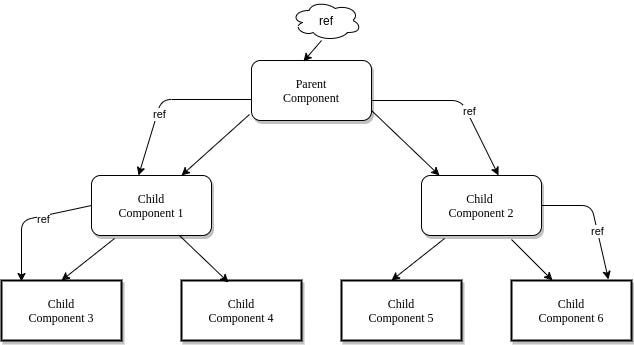
Example:
Parent holds state
Child receives props
Child triggers updates
👉 Hooks make this flow clean and reusable
🔁 Component Reusability with Hooks

Hooks allow you to:
✔ Extract logic
✔ Reuse it across components
✔ Keep UI clean
⚠️ Rules of Hooks (Must Follow)
❌ Don’t use Hooks inside loops
❌ Don’t use Hooks inside conditions
✔ Use Hooks at top level
✔ Use Hooks only inside React components


