Advanced JavaScript Concepts – Deep Dive

I’m Arjun Saxena, a passionate software developer specializing in web engineering. I believe in writing code that creates real solutions to real problems. I love building efficient, user-friendly applications and constantly push myself to learn new technologies. Beyond coding, I enjoy sharing knowledge and growing together with others in the tech community.
Mastering the Core Ideas That Power Modern JavaScript
Once you know JavaScript basics, the real power comes from understanding how JavaScript works internally.
In this blog, you’ll learn:
call,apply, andbind(clearly explained)Closures and why they are so powerful
thiskeyword in different contextsDebouncing & Throttling for performance
JavaScript modules (
import/export)Error handling with
try,catch, and custom errors
No unnecessary theory — only what actually matters.
1️⃣ Call, Apply, and Bind – Deep Dive
The Problem They Solve
Sometimes you want to control what this refers to.
Simple Example Object
const user = {
  name: "Arjun",
  greet() {
    console.log(`Hello, ${this.name}`);
  }
};
🔹 call()
Calls a function immediately with a specific
this.
user.greet.call({ name: "Rahul" });
✅ Output:
Hello, Rahul
🔹 apply()
Same as call, but arguments are passed as an array.
function introduce(city, country) {
  console.log(`${this.name} from ${city}, ${country}`);
}

introduce.apply(
  { name: "Arjun" },
  ["Delhi", "India"]
);
🔹 bind()
Returns a new function with
thispermanently fixed.
const boundFn = user.greet.bind({ name: "Amit" });
boundFn();
✔ Useful for callbacks & event handlers
call vs apply vs bind (Quick Table)
| Method | Executes Immediately | Arguments | Returns |
| call | ✅ Yes | Comma-separated | Result |
| apply | ✅ Yes | Array | Result |
| bind | ❌ No | Comma-separated | New function |
2️⃣ Closures – The Most Important Concept
Simple Definition:
A closure is when a function remembers variables from its outer scope, even after that outer function has finished execution.
Simple Closure Example
function counter() {
  let count = 0;

  return function () {
    count++;
    console.log(count);
  };
}

const increment = counter();
increment(); // 1
increment(); // 2
Why This Works?
Inner function remembers
countcountis not destroyed
🔁 Closure & Call Stack Visualization
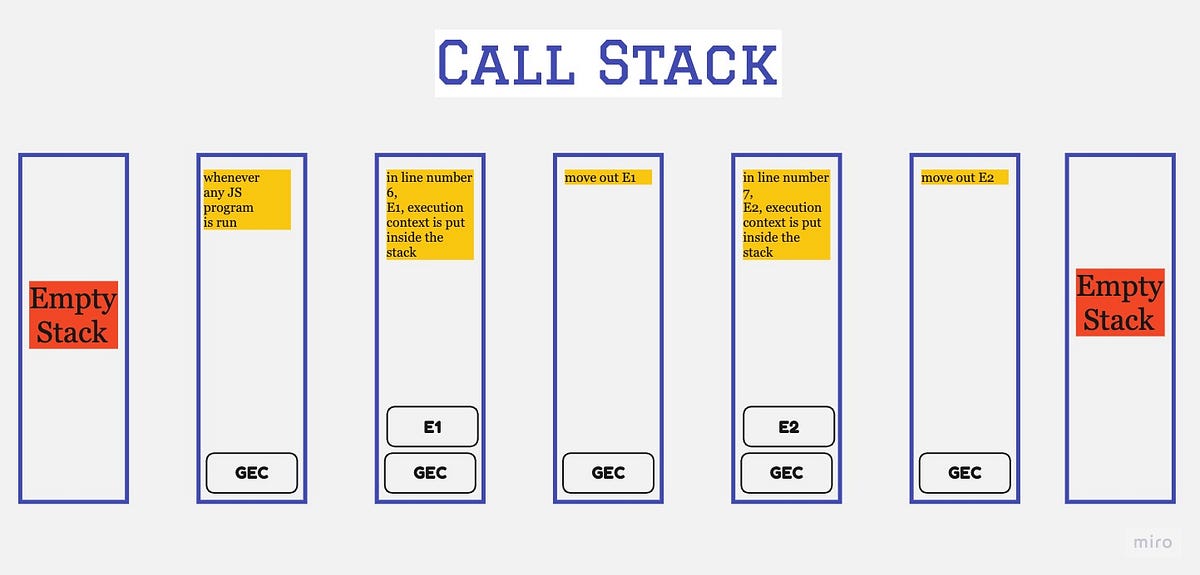
✔ Closures preserve data
✔ Used in event handlers, hooks, factories
3️⃣ Debouncing and Throttling (Performance Optimization)
These are must-know concepts for real applications.
🔹 Debouncing
Executes function after user stops performing an action
Example Use Case:
Search input
Resize event
function debounce(fn, delay) {
  let timer;
  return function () {
    clearTimeout(timer);
    timer = setTimeout(fn, delay);
  };
}
✔ Avoids unnecessary API calls
🔹 Throttling
Executes function at fixed intervals
Example Use Case:
Scroll events
Button spam prevention
function throttle(fn, limit) {
  let flag = true;
  return function () {
    if (flag) {
      fn();
      flag = false;
      setTimeout(() => (flag = true), limit);
    }
  };
}
Debounce vs Throttle
| Feature | Debounce | Throttle |
| Execution | After delay | Fixed interval |
| Best for | Search input | Scroll events |
4️⃣ Understanding this Keyword
Rule:
thisdepends on how a function is called, not where it’s written.
Global Scope
console.log(this); // window (browser)
Inside an Object
const obj = {
  name: "JS",
  show() {
    console.log(this.name);
  }
};
obj.show(); // JS
Arrow Functions ⚠️
const obj = {
  name: "JS",
  show: () => {
    console.log(this.name);
  }
};
❌ Arrow functions do not have their own this.
🔁 this Flowchart

5️⃣ JavaScript Modules – import & export
Before Modules ❌
<script src="file1.js"></script>
<script src="file2.js"></script>
Problems:
Global scope pollution
Order dependency
Modern JavaScript Modules ✅
// math.js
export function add(a, b) {
  return a + b;
}
// main.js
import { add } from "./math.js";
console.log(add(2, 3));
✔ Clean
✔ Scoped
✔ Maintainable
6️⃣ Handling Errors in JavaScript
try…catch Basics
try {
  JSON.parse("{ invalid }");
} catch (error) {
  console.log("Something went wrong");
}
Custom Errors
function withdraw(amount) {
  if (amount <= 0) {
    throw new Error("Invalid amount");
  }
}
✔ Better debugging
✔ Clear error messages


