Arrays and Objects in JavaScript
I’m Arjun Saxena, a passionate software developer specializing in web engineering. I believe in writing code that creates real solutions to real problems. I love building efficient, user-friendly applications and constantly push myself to learn new technologies. Beyond coding, I enjoy sharing knowledge and growing together with others in the tech community.
Working with Data the Easy Way (Beginner Friendly)
Data is everywhere in programming.
JavaScript mainly stores and manages data using Arrays and Objects.
If you understand these two well, 90% of JavaScript becomes easy.
In this blog, you’ll learn:
What arrays and objects are
Common and important array methods
When to use arrays vs objects
All explained with real-life scenarios and simple code
What Is an Array? 🧺
An array is a list of values stored in a single variable.
Real-Life Analogy: Shopping List 🛒
Milk
Bread
Eggs
That’s an array — ordered items in a list.
Array Example in JavaScript
const fruits = ["Apple", "Banana", "Mango"];
Index starts from 0
fruits[0]→ Applefruits[1]→ Banana
What Is an Object? 📦
An object stores data in key–value pairs.
Real-Life Analogy: Student Record 🧑🎓
Name: Arjun
Age: 22
City: Delhi
That’s an object — information with labels.
Object Example in JavaScript
const student = {
  name: "Arjun",
  age: 22,
  city: "Delhi"
};
Accessing values:
student.name; // Arjun
student.age;  // 22
Array vs Object (Quick Comparison)
| Feature | Array | Object |
| Stores | List of values | Key-value pairs |
| Order matters | Yes | No |
| Access | Index | Key |
| Use when | Multiple similar items | Descriptive data |
Common Array Methods (With Scenarios)
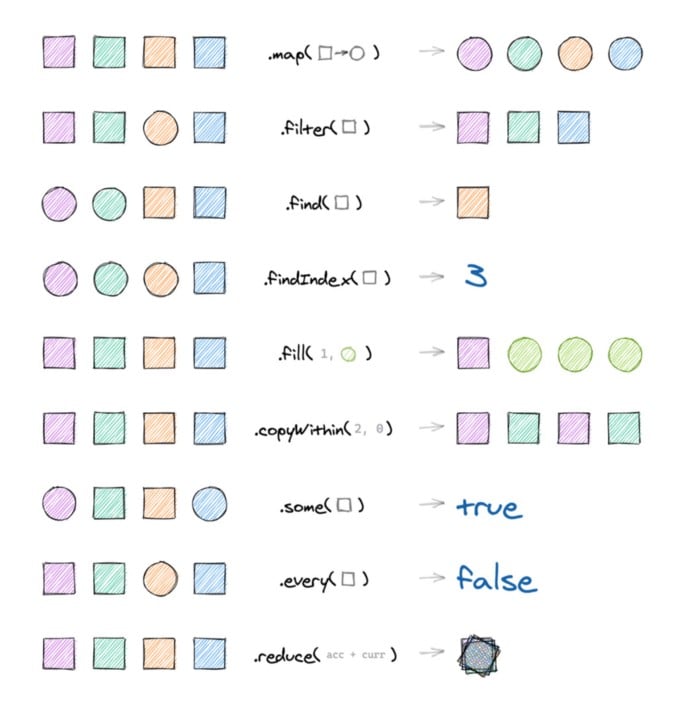
1️⃣ push() – Add Item at the End
Scenario: Adding Item to Cart 🛒
const cart = ["Shoes", "Shirt"];
cart.push("Watch");

console.log(cart);
// ["Shoes", "Shirt", "Watch"]
✔ Adds item at the end
2️⃣ pop() – Remove Last Item
Scenario: Removing Last Added Item ❌
cart.pop();

console.log(cart);
// ["Shoes", "Shirt"]
✔ Removes last item
3️⃣ unshift() – Add at the Beginning
Scenario: Priority Task Added 📝
const tasks = ["Code", "Test"];
tasks.unshift("Meeting");

console.log(tasks);
// ["Meeting", "Code", "Test"]
4️⃣ shift() – Remove from Beginning
tasks.shift();

console.log(tasks);
// ["Code", "Test"]
5️⃣ forEach() – Loop Through Items
Scenario: Printing All Students 📢
const students = ["Arjun", "Rahul", "Sneha"];

students.forEach((name) => {
  console.log(name);
});
✔ Best for doing something with each item
6️⃣ map() – Transform Each Item 🔄
Scenario: Add “₹” Symbol to Prices 💰
const prices = [100, 200, 300];

const updatedPrices = prices.map(price => `₹${price}`);
Result:
["₹100", "₹200", "₹300"]
✔ Returns a new array
7️⃣ filter() – Select Specific Items 🔍
Scenario: Passing Students 🎓
const marks = [45, 80, 30, 90];

const passed = marks.filter(mark => mark >= 50);
Result:
[80, 90]
✔ Filters data based on condition
8️⃣ reduce() – Combine into One Value ➕
Scenario: Total Bill Amount 🧾
const bills = [100, 200, 300];

const total = bills.reduce((sum, bill) => sum + bill, 0);
Result:
600
✔ Used for sum, average, totals
9️⃣ find() – Find First Matching Item 🔎
Scenario: Finding a User
const users = [
  { id: 1, name: "Arjun" },
  { id: 2, name: "Rahul" }
];

const user = users.find(u => u.id === 2);
Result:
{ id: 2, name: "Rahul" }
1️⃣0️⃣ includes() – Check Availability ✅
Scenario: Checking Permission
const roles = ["admin", "editor"];

roles.includes("admin"); // true
Objects with Arrays (Real-World Example)
Scenario: Online Store 🛍️
const product = {
  name: "Laptop",
  price: 50000,
  features: ["SSD", "16GB RAM", "i7"]
};
Looping features:
product.features.forEach(feature => {
  console.log(feature);
});
Array of Objects (Very Common in Real Apps)
const employees = [
  { name: "Arjun", role: "Developer" },
  { name: "Sneha", role: "Designer" }
];
Filter developers:
const devs = employees.filter(emp => emp.role === "Developer");
When to Use What? 🤔
Use Array When:
Order matters
You have list-like data
Use Object When:
Data needs labels
You want meaningful structure


