Event Handling in React

I’m Arjun Saxena, a passionate software developer specializing in web engineering. I believe in writing code that creates real solutions to real problems. I love building efficient, user-friendly applications and constantly push myself to learn new technologies. Beyond coding, I enjoy sharing knowledge and growing together with others in the tech community.
Controlled & Uncontrolled Inputs + Interactive Forms (Beginner Friendly)
Forms are everywhere — login pages, signup forms, search boxes, feedback forms.
In React, handling user input properly is a core skill.
In this article, we’ll learn:
What event handling means in React
Controlled vs Uncontrolled inputs
How data flows in controlled components
How to build interactive forms
Using React Hook Form for cleaner form handling
A simple idea of event bubbling & capturing
No complex words, no confusion — just clear concepts + examples.
1️⃣ What is Event Handling in React?
An event is something that happens in the browser:
Clicking a button
Typing in an input
Submitting a form
React handles events using camelCase and functions.
Example: Button Click Event
function App() {
  function handleClick() {
    alert("Button clicked!");
  }

  return <button onClick={handleClick}>Click Me</button>;
}
👉 Here:
onClickis the eventhandleClickis the function that runs when the event happens
2️⃣ Controlled Inputs in React
A controlled input means:
React controls the input value using state
Simple Definition
Input value = React state
Example: Controlled Input
import { useState } from "react";

function App() {
  const [name, setName] = useState("");

  return (
    <>
      <input
        type="text"
        value={name}
        onChange={(e) => setName(e.target.value)}
      />
      <p>Your name is: {name}</p>
    </>
  );
}
How this works:
User types in input
onChangeevent firesState updates using
setNameUI re-renders with updated value
🔁 Controlled Input Data Flow
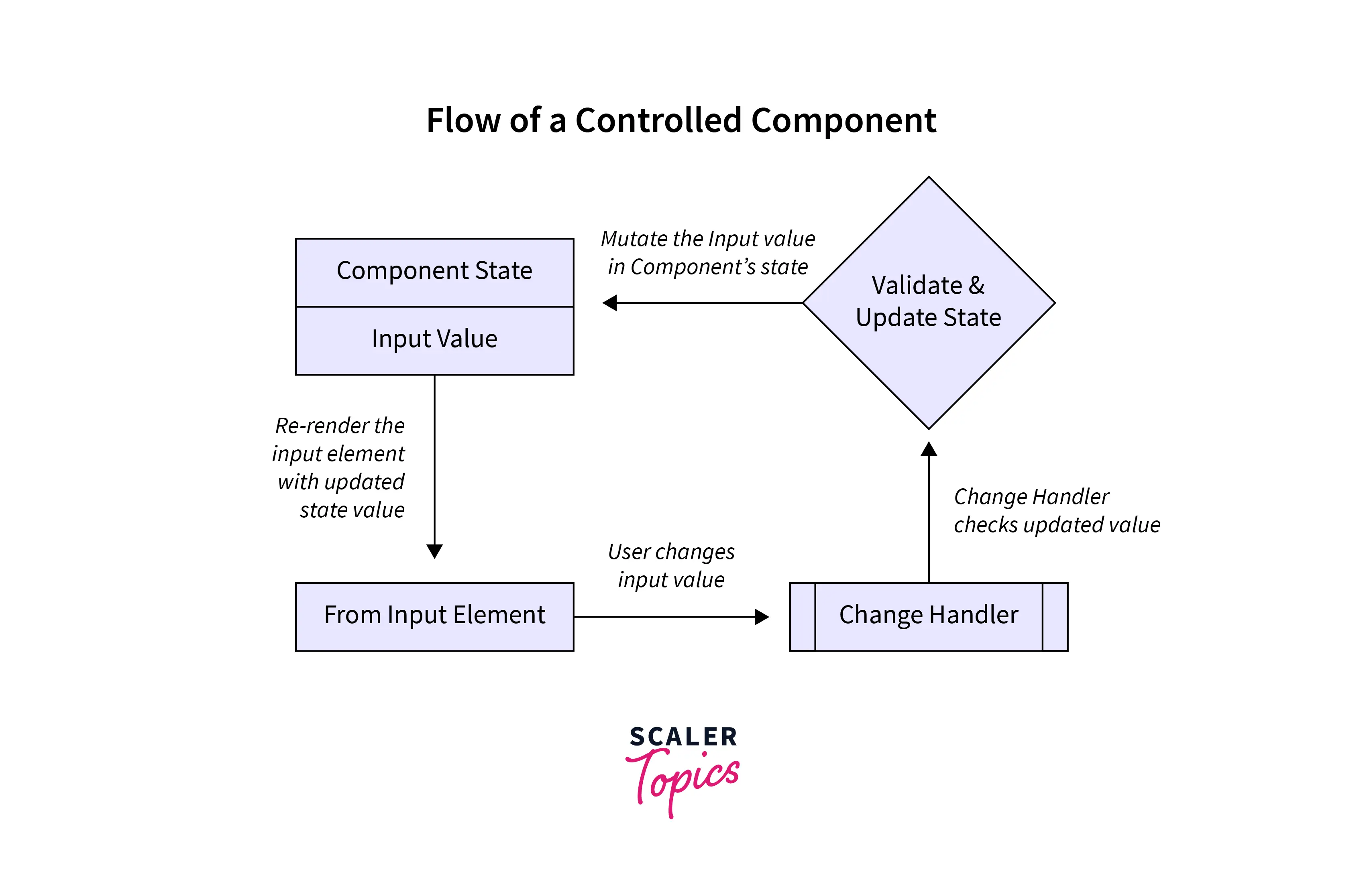
Flow:
User types → onChange → setState → React → Input value updates
3️⃣ Uncontrolled Inputs in React
An uncontrolled input means:
The DOM (browser) controls the input, not React
We use refs instead of state.
Example: Uncontrolled Input
import { useRef } from "react";

function App() {
  const inputRef = useRef();

  function handleSubmit() {
    alert(inputRef.current.value);
  }

  return (
    <>
      <input type="text" ref={inputRef} />
      <button onClick={handleSubmit}>Submit</button>
    </>
  );
}
Key Difference:
No
useStateValue accessed only when needed
⚖️ Controlled vs Uncontrolled Inputs
| Feature | Controlled | Uncontrolled |
| Value stored in | React State | DOM |
| Re-render on change | Yes | No |
| Validation | Easy | Hard |
| Recommended | ✅ Yes | ⚠️ Rare cases |
👉 Controlled inputs are preferred in React
4️⃣ Creating Interactive Forms in React
Let’s build a simple login form 👇
import { useState } from "react";

function LoginForm() {
  const [email, setEmail] = useState("");
  const [password, setPassword] = useState("");

  function handleSubmit(e) {
    e.preventDefault();
    console.log(email, password);
  }

  return (
    <form onSubmit={handleSubmit}>
      <input
        type="email"
        placeholder="Email"
        value={email}
        onChange={(e) => setEmail(e.target.value)}
      />

      <input
        type="password"
        placeholder="Password"
        value={password}
        onChange={(e) => setPassword(e.target.value)}
      />

      <button type="submit">Login</button>
    </form>
  );
}
Important Points:
onSubmitprevents page reloadInputs are controlled
Form reacts instantly to user input
5️⃣ Form Handling with React Hook Form (Best Practice)
When forms grow big, use React Hook Form.
Install:
npm install react-hook-form
Example: React Hook Form
import { useForm } from "react-hook-form";

function App() {
  const { register, handleSubmit } = useForm();

  function onSubmit(data) {
    console.log(data);
  }

  return (
    <form onSubmit={handleSubmit(onSubmit)}>
      <input {...register("username")} placeholder="Username" />
      <input {...register("email")} placeholder="Email" />
      <button type="submit">Submit</button>
    </form>
  );
}
Why React Hook Form?
Less code
Better performance
Easy validation
Clean structure
6️⃣ Event Bubbling & Capturing (Simple Explanation)
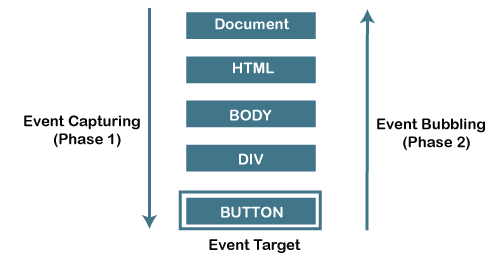
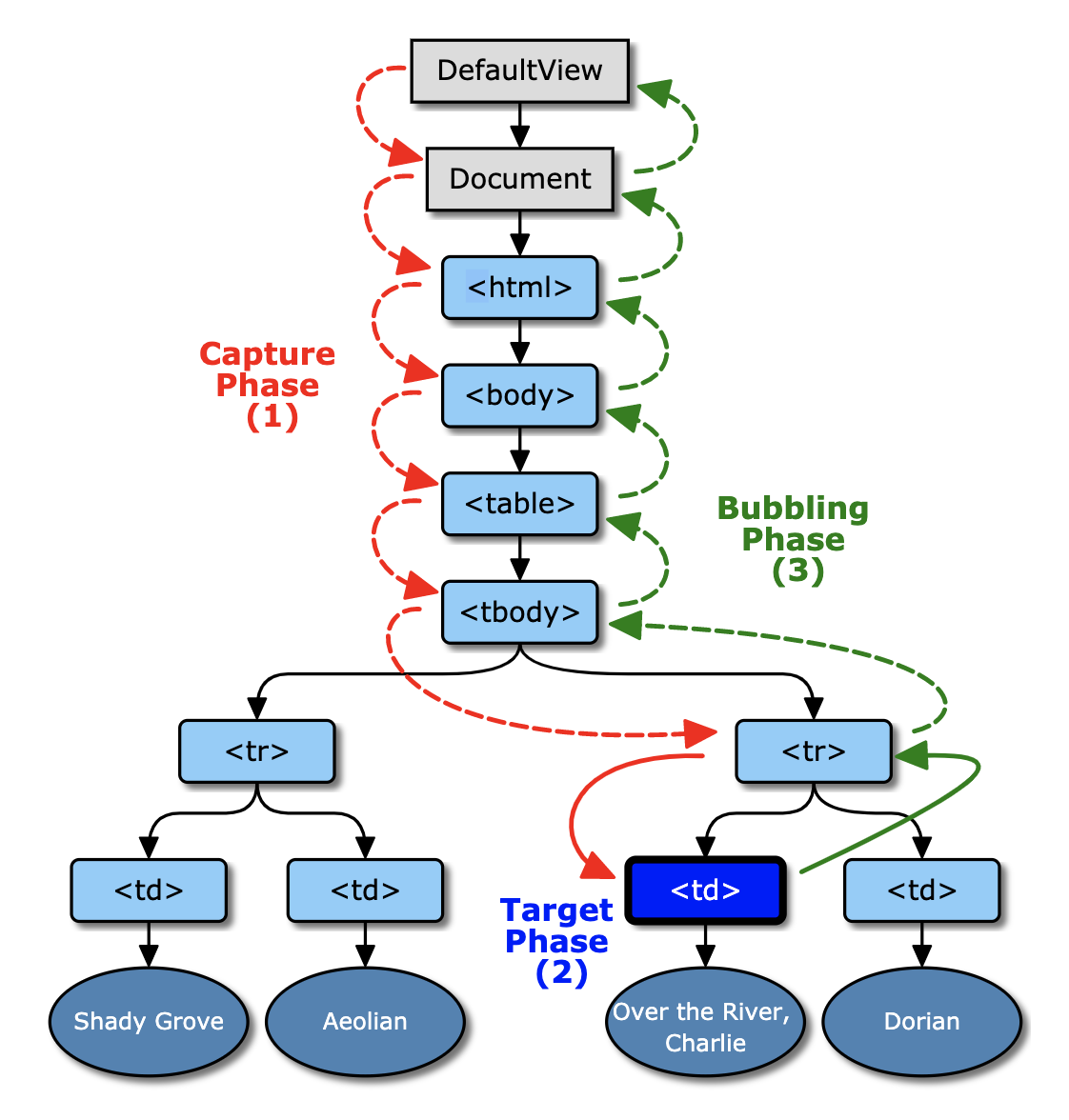
Event Bubbling:
Event goes from child → parent
Event Capturing:
Event goes from parent → child
Example: Event Bubbling
function App() {
  return (
    <div onClick={() => alert("Div clicked")}>
      <button onClick={() => alert("Button clicked")}>
        Click Me
      </button>
    </div>
  );
}
👉 Clicking button will show:
Button clicked
Div clicked


