Express.js – Simplifying Backend Development

I’m Arjun Saxena, a passionate software developer specializing in web engineering. I believe in writing code that creates real solutions to real problems. I love building efficient, user-friendly applications and constantly push myself to learn new technologies. Beyond coding, I enjoy sharing knowledge and growing together with others in the tech community.
Build Web Servers Easily with Node.js (Beginner Friendly)
Writing backend code using plain Node.js can feel long and confusing.
Express.js makes backend development simple, clean, and fast.
In this blog, you’ll learn:
How to create a simple web server with Node.js
Why Express.js is better than raw Node.js
Creating routes and handling requests
What middleware is and why it’s powerful
URL parameters vs query strings
All explained in a very easy, real-world way.
What Is Express.js? 🤔
Simple Definition
Express.js is a lightweight framework built on top of Node.js that helps you build web servers and APIs easily.
Think of it like this:
Node.js → raw engine
Express.js → smooth steering + controls
Why Do We Need Express.js?
Using only Node.js:
Code becomes long 😓
Routing is manual
Hard to manage large apps
Express.js:
Reduces boilerplate ✨
Easy routing
Built-in middleware support
Cleaner structure
Creating a Simple Web Server (Node.js vs Express)
Using Raw Node.js ❌
const http = require("http");

const server = http.createServer((req, res) => {
  if (req.url === "/" && req.method === "GET") {
    res.write("Hello from Node.js");
    res.end();
  }
});

server.listen(3000, () => {
  console.log("Server running on port 3000");
});
👎 Too much manual work
👎 Hard to scale
Using Express.js ✅
const express = require("express");
const app = express();

app.get("/", (req, res) => {
  res.send("Hello from Express.js");
});

app.listen(3000, () => {
  console.log("Server running on port 3000");
});
👍 Cleaner
👍 Readable
👍 Easy to extend
Creating Routes in Express 🛣️
Routes define how your server responds to requests.
Basic Route Example
app.get("/about", (req, res) => {
  res.send("About Page");
});
/about→ URLGET→ HTTP method
Handling Different HTTP Methods
app.post("/login", (req, res) => {
  res.send("Login successful");
});
Common methods:
GET → fetch data
POST → send data
PUT → update data
DELETE → remove data
Request & Response Objects 📦
Express gives two powerful objects:
app.get("/user", (req, res) => {
  res.send("User route");
});
req→ incoming requestres→ outgoing response
What Is Middleware in Express? 🧩
Simple Definition
Middleware is a function that runs between request and response.
Real-Life Analogy 🚦
Request → Security check
→ ID verification
→ Controller
→ Response
Each step = middleware.
Express Middleware Flow
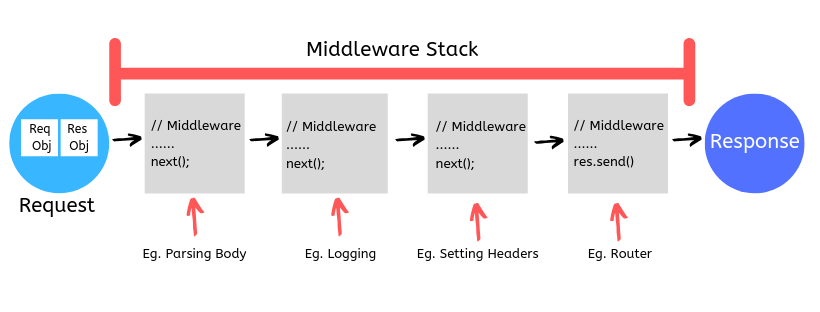
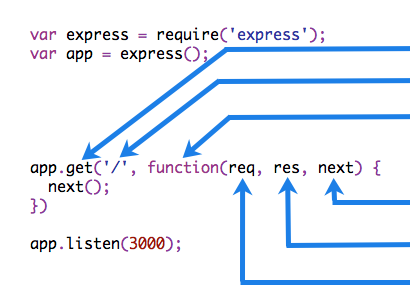
Request → Middleware → Route → Response
Example: Custom Middleware
function logger(req, res, next) {
  console.log("Request received");
  next(); // move to next step
}

app.use(logger);
✔ Runs for every request
✔ next() is mandatory
Built-in Middleware Example
app.use(express.json());
✔ Parses JSON body
✔ Used in APIs
URL Parameters vs Query Strings 🔍
URL Parameters
Used when data is required.
Example:
app.get("/users/:id", (req, res) => {
  res.send(`User ID: ${req.params.id}`);
});
URL:
/users/5
📌 Best for:
User ID
Product ID
Blog slug
Query Strings
Used for optional data.
Example:
app.get("/search", (req, res) => {
  res.send(req.query.q);
});
URL:
/search?q=express
📌 Best for:
Search
Filters
Pagination
URL Params vs Query Strings (Easy Table)
| Feature | URL Params | Query Strings |
| Required | Yes | No |
| Visible | Yes | Yes |
| Example | /users/1 | /search?q=node |
| Access | req.params | req.query |
Nested Routes (Tree Structure)
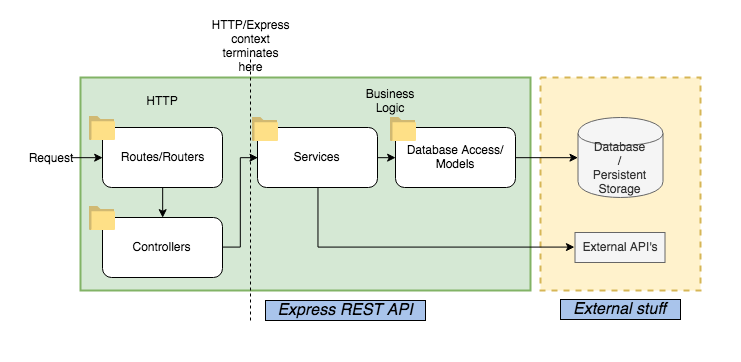
Example:
/api
 ├─ /users
 │   ├─ /:id
 │   └─ /create
 └─ /products
Request → Middleware → Controller Flow


Typical Flow:
Client Request
→ Middleware (auth, logger)
→ Controller (logic)
→ Response


