Internet Protocols Explained

I’m Arjun Saxena, a passionate software developer specializing in web engineering. I believe in writing code that creates real solutions to real problems. I love building efficient, user-friendly applications and constantly push myself to learn new technologies. Beyond coding, I enjoy sharing knowledge and growing together with others in the tech community.
TCP/IP, UDP, OSI Model & Why Network Protocols Matter
Whenever you:
Open a website 🌐
Send a message 💬
Watch a video ▶️
👉 Network protocols are working silently behind the scenes.
In this blog, we’ll understand:
What network protocols are
Why they are important
The OSI Model
TCP/IP basics
Difference between TCP and UDP
Real-world examples (very simple)
No heavy theory — just clarity.
1️⃣ What Are Network Protocols?
Simple Definition:
A network protocol is a set of rules that devices follow to communicate with each other.
Think of protocols like languages.
Real-Life Example:
If:
You speak Hindi
Your friend speaks English
Communication fails ❌
👉 Protocols ensure both sides follow the same rules so communication works.
Example in Internet:
When your browser asks a server:
“Give me the homepage”
Protocols define:
How the request is sent
How data is broken into parts
How the response comes back
2️⃣ Why Do Network Protocols Matter?
Protocols make sure that:
Data reaches the correct destination
Data is not corrupted
Communication is fast and reliable
Without protocols:
Internet = chaos ❌
Websites won’t load
Messages won’t reach
3️⃣ OSI Model – Understanding Internet Layers
The OSI Model explains how data travels from one device to another using 7 layers.
Simple Idea:
Each layer has a specific responsibility
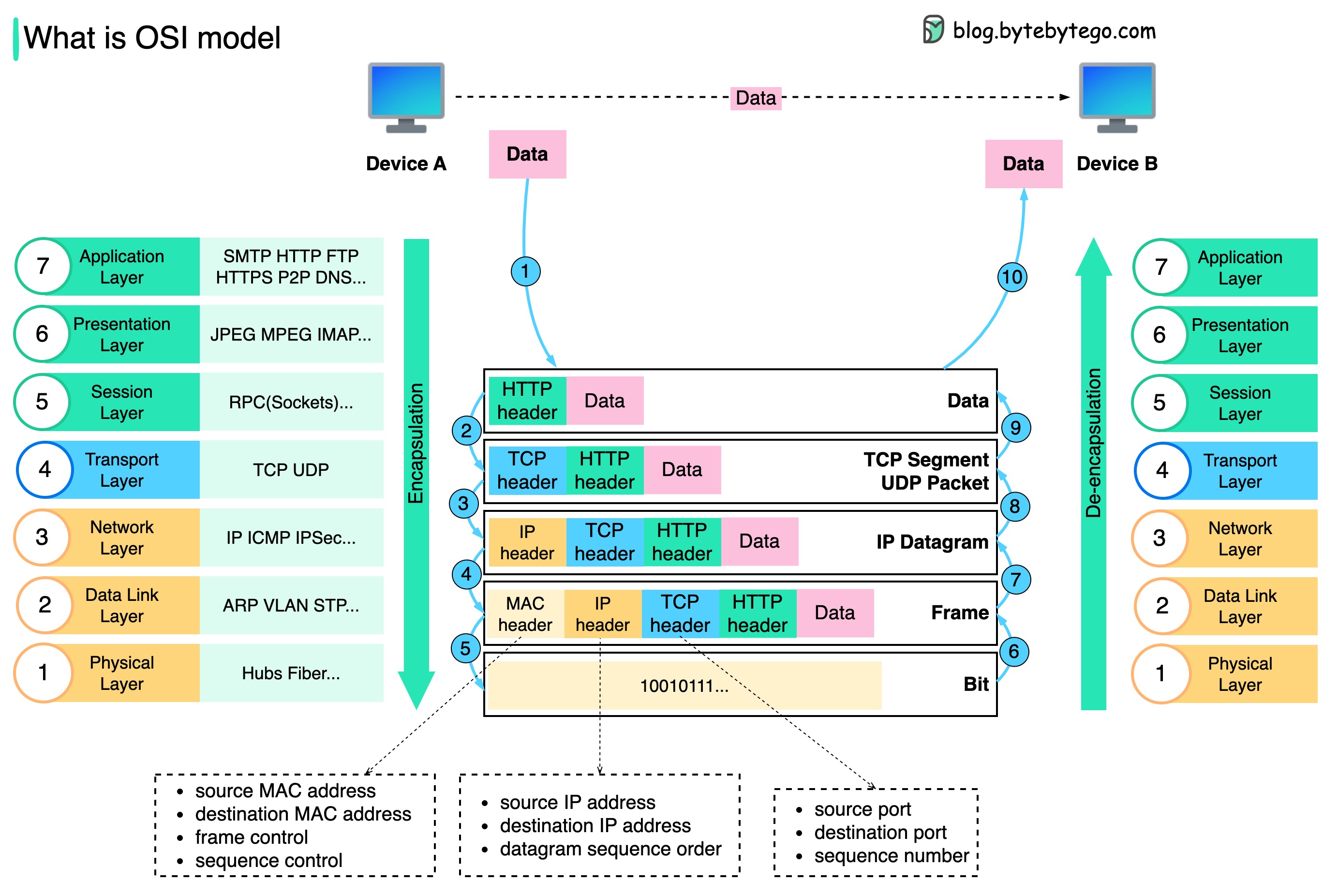
OSI Model Layers (Easy Explanation)
| Layer | Name | What It Does |
| 7 | Application | User interacts (Browser, Email) |
| 6 | Presentation | Data formatting, encryption |
| 5 | Session | Manages sessions |
| 4 | Transport | Data delivery (TCP/UDP) |
| 3 | Network | IP addressing & routing |
| 2 | Data Link | MAC address, local delivery |
| 1 | Physical | Cables, signals |
Real-World Example:
Sending a WhatsApp message:
Application layer: You type message
Transport layer: Data broken into packets
Network layer: Finds receiver IP
Physical layer: Signals travel via cables/wireless
4️⃣ What is TCP/IP?
TCP/IP = Backbone of the Internet
TCP/IP is a set of protocols that allows computers to communicate over the internet.
It mainly has 4 layers (simplified version of OSI).

TCP/IP Layers
| Layer | Purpose |
| Application | HTTP, HTTPS, FTP |
| Transport | TCP, UDP |
| Internet | IP |
| Network Access | Ethernet, Wi-Fi |
5️⃣ TCP – Transmission Control Protocol
Simple Definition:
TCP ensures data is delivered correctly and completely
Key Features:
✔ Reliable
✔ Ordered data
✔ Error checking
✔ Retransmission if data lost
Real-Life Example:
📦 Courier Service
Package must arrive
If damaged → resend
Receiver confirms delivery
👉 That’s TCP!
Where TCP is Used:
Websites (HTTP/HTTPS)
Emails
File downloads
6️⃣ UDP – User Datagram Protocol
Simple Definition:
UDP sends data fast, but does not guarantee delivery
Key Features:
⚡ Very fast
❌ No confirmation
❌ No retransmission
Real-Life Example:
📢 Live Announcement
Message is broadcast
If someone misses it → no repeat
👉 That’s UDP!
Where UDP is Used:
Video streaming
Online gaming
Live calls (Zoom, Google Meet)
7️⃣ TCP vs UDP (Very Important)
| Feature | TCP | UDP |
| Speed | Slower | Faster |
| Reliability | High | Low |
| Order | Maintained | Not guaranteed |
| Use Case | Web pages, emails | Streaming, gaming |
8️⃣ How Data Travels (Simple Flow)
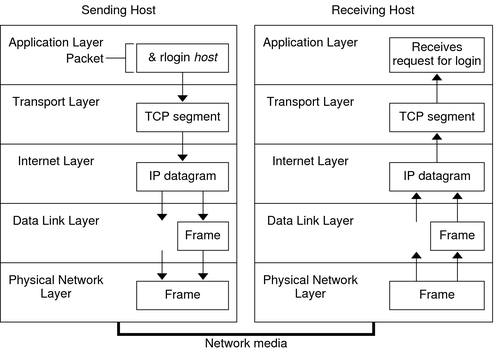
Step-by-Step:
User requests website
Data breaks into packets
IP finds destination
TCP/UDP sends data
Server responds
Browser displays content
9️⃣ Why Web Developers Must Know This?
As a web developer, this helps you:
Understand API calls
Debug network errors
Improve performance
Choose TCP vs UDP use cases
Work better with backend & DevOps


