Introduction to React.js

I’m Arjun Saxena, a passionate software developer specializing in web engineering. I believe in writing code that creates real solutions to real problems. I love building efficient, user-friendly applications and constantly push myself to learn new technologies. Beyond coding, I enjoy sharing knowledge and growing together with others in the tech community.
Building Fast & Interactive User Interfaces
Modern websites are not just pages — they are interactive applications.
React.js helps us build these applications efficiently, cleanly, and fast.
In this blog, you’ll learn:
What React is and why it exists
Traditional DOM vs Virtual DOM
What JSX is and why it’s used
How React renders components
Step-by-step setup of your first React app
All explained in a very simple, beginner-friendly way.
What Is React? 🤔
Simple Definition
React is a JavaScript library used to build user interfaces, especially for single-page applications.
React was created by Facebook and is widely used by:
Facebook
Instagram
Netflix
Airbnb
Why Was React Created?
Before React:
Websites were slow to update
DOM manipulation was complex
Code became messy for large apps
React solves this by:
Breaking UI into components
Updating only what changes
Keeping code organized
React vs Traditional JavaScript (Big Picture)
Traditional Way 🧱
Directly update the DOM
Every change re-renders large parts of UI
Slow for big apps
React Way ⚛️
Uses Virtual DOM
Updates only changed parts
Faster & more efficient
Understanding the DOM (Quick Recap)
What Is the DOM?
DOM (Document Object Model) is a tree-like structure of your HTML page.
When JavaScript changes the DOM:
Browser recalculates layout
Repaints the UI
Takes time ⏳
Real DOM vs Virtual DOM (Very Important)

Real DOM ❌
How It Works:
Change happens
Entire DOM updates
Page becomes slower
Example:
Updating a list of 1000 items:
Browser checks all 1000
Even if only 1 item changed
Virtual DOM ✅
What Is Virtual DOM?
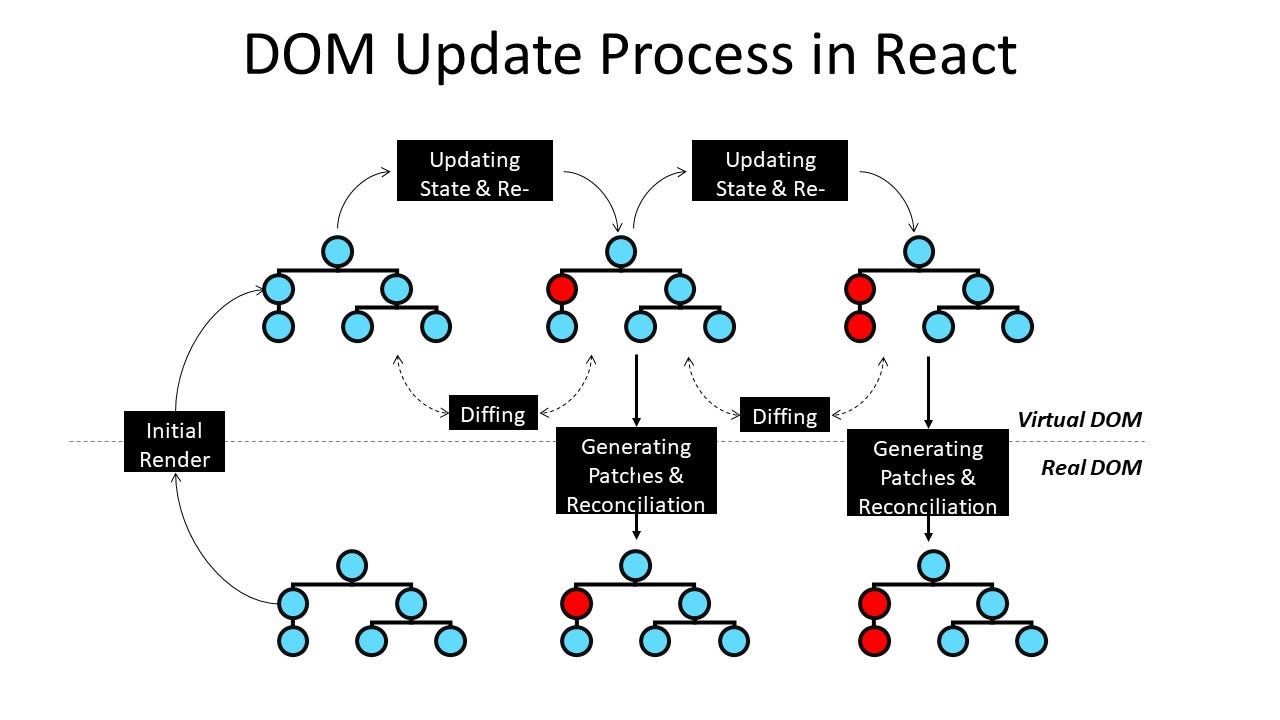
Virtual DOM is a lightweight copy of the real DOM, stored in memory.
How It Works:
React updates Virtual DOM
React compares old vs new Virtual DOM (diffing)
Only changed parts update in Real DOM
📌 This makes React fast and efficient.
One-Line Difference
Real DOM updates everything, Virtual DOM updates only what changed.
What Is JSX? 🧠
HTML-like Syntax Inside JavaScript
JSX looks like HTML but is actually JavaScript.
JSX Example
const element = <h1>Hello, React!</h1>;
This is not HTML — it’s JSX.
JSX Behind the Scenes
<h1>Hello</h1>
is converted to:
React.createElement("h1", null, "Hello");
📌 JSX makes code:
Easier to read
Easier to write
Closer to UI thinking
JSX Rules (Beginner Tips)
✔ Must return one parent element
✔ Use className instead of class
✔ JavaScript inside {}
JSX with JavaScript
const name = "Arjun";

<h1>Hello {name}</h1>
Output:
Hello Arjun
React Components (Quick Intro)
A component is a reusable piece of UI.
Simple Component Example
function Welcome() {
  return <h2>Welcome to React!</h2>;
}
Using it:
<Welcome />
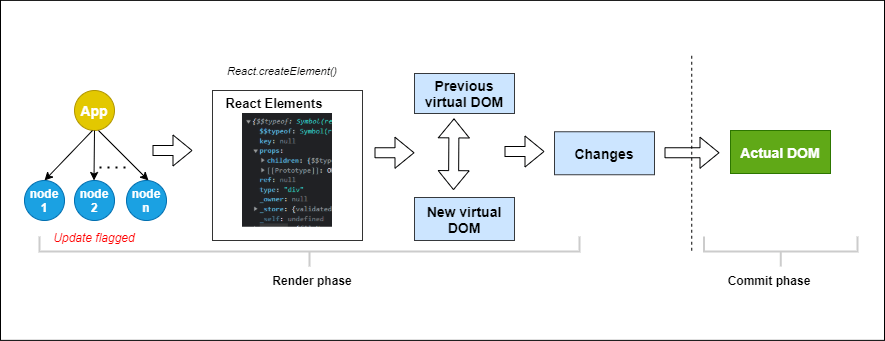
React Rendering Flow 🔁
Flow:
Component → JSX → Virtual DOM → Diffing → Real DOM Update
Step-by-Step: Create Your First React App 🛠️
We’ll use Vite (modern & fast).
Step 1: Install Node.js
Download from:
👉 https://nodejs.org
Check installation:
node -v
npm -v
Step 2: Create React App with Vite
npm create vite@latest my-react-app
cd my-react-app
npm install
npm run dev
Step 3: Project Structure (Simple)
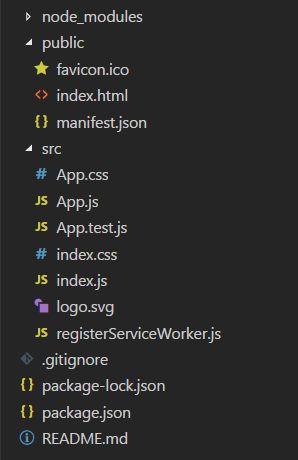
src/
 ├─ App.jsx
 ├─ main.jsx
 └─ index.css
Step 4: Your First Component
function App() {
  return <h1>Hello React 🚀</h1>;
}

export default App;
Open browser:
http://localhost:5173
🎉 You just ran your first React app!


