JavaScript Basics – The Language of the Web

I’m Arjun Saxena, a passionate software developer specializing in web engineering. I believe in writing code that creates real solutions to real problems. I love building efficient, user-friendly applications and constantly push myself to learn new technologies. Beyond coding, I enjoy sharing knowledge and growing together with others in the tech community.
Variables, Data Types & Control Flow (Beginner Friendly)
JavaScript is the brain of the web.
It makes websites interactive, dynamic, and smart.
In this blog, you’ll learn:
What variables are and how to use them
Data types explained with real-world examples
JavaScript operators
Control flow using
if,else, andswitchClear diagrams for better understanding
No complicated theory — only basics done right.
1️⃣ What is JavaScript?
Simple Definition:
JavaScript is a programming language that runs in the browser and makes web pages interactive.
Examples:
Button clicks
Form validation
Dynamic content updates
Animations
2️⃣ Variables in JavaScript
What is a Variable?
A variable is a container used to store data.
Declaring Variables
JavaScript has three ways to declare variables:
var name = "Arjun";
let age = 21;
const country = "India";
3️⃣ var vs let vs const (Very Important)
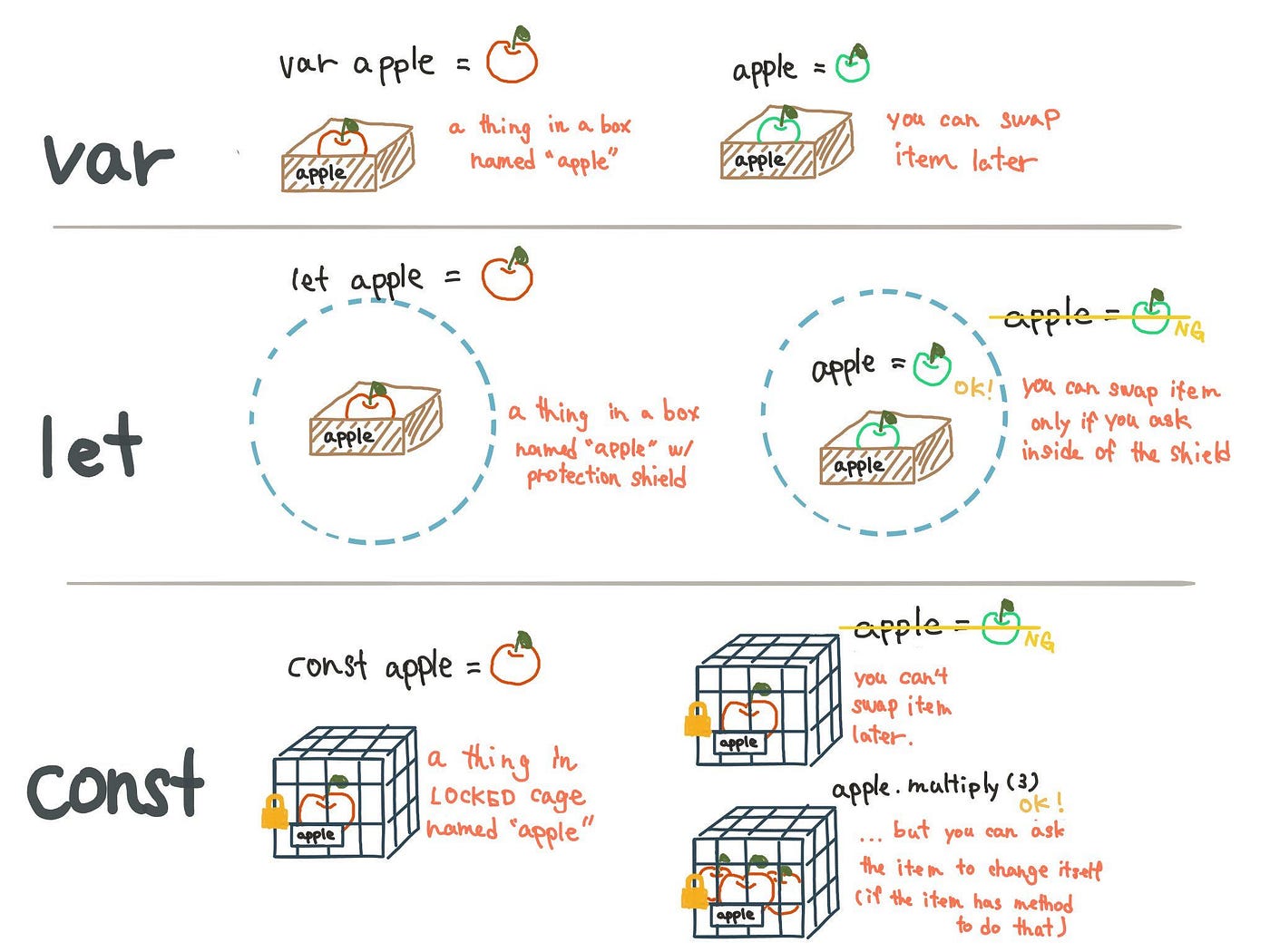
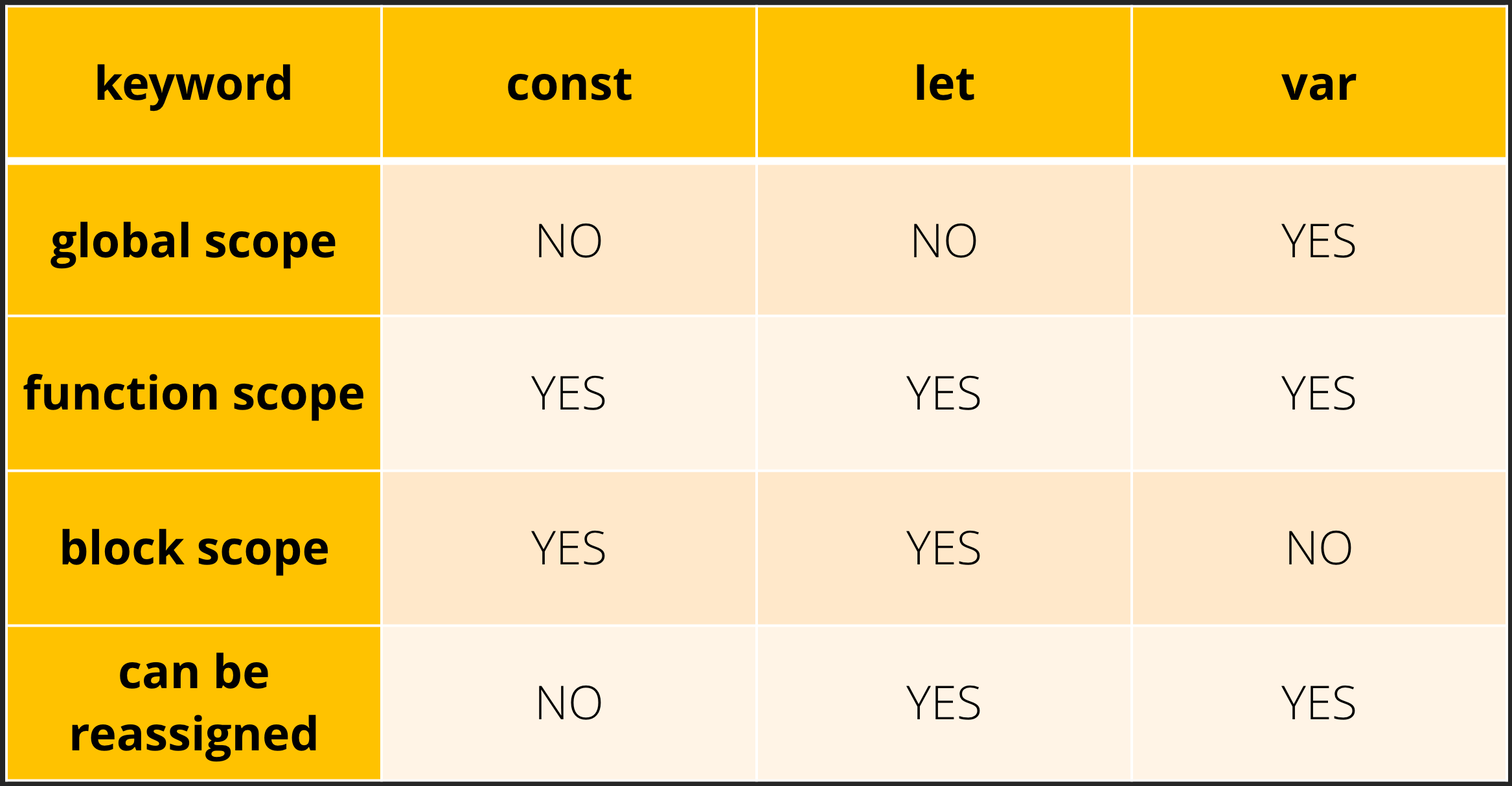
Comparison Table
| Keyword | Scope | Can Reassign | Use Case |
| var | Function | ✅ Yes | ❌ Avoid |
| let | Block | ✅ Yes | ✅ Recommended |
| const | Block | ❌ No | ✅ Default choice |
Simple Rule:
✔ Use const by default
✔ Use let if value changes
❌ Avoid var
4️⃣ JavaScript Data Types (With Real-World Examples)
What is a Data Type?
Data type defines what kind of value a variable holds.
4.1 String
let name = "Arjun";
🧑 Real-world example:
Name, city, email → string
4.2 Number
let age = 22;
🎂 Real-world example:
Age, price, score → number
4.3 Boolean
let isLoggedIn = true;
🔐 Real-world example:
Login status → true / false
4.4 Undefined
let value;
📦 Variable declared but not assigned
4.5 Null
let data = null;
🗑️ Intentionally empty value
4.6 Object
let user = {
  name: "Arjun",
  age: 22
};
🧾 Real-world example:
User profile, product details
4.7 Array
let skills = ["HTML", "CSS", "JS"];
📚 List of items
5️⃣ JavaScript Operators (Basics)
Operators perform actions on values.
5.1 Arithmetic Operators
let sum = 10 + 5;
let diff = 10 - 5;
➕ Add, ➖ Subtract, ✖ Multiply, ➗ Divide
5.2 Comparison Operators
10 > 5   // true
10 === 10 // true
✔ Used in conditions
5.3 Logical Operators
true && false // false
true || false // true
✔ Used in decision making
6️⃣ Control Flow in JavaScript
What is Control Flow?
Control flow decides which code runs and when.
7️⃣ if-else Statement
Example: Age Check
let age = 18;

if (age >= 18) {
  console.log("You can vote");
} else {
  console.log("You cannot vote");
}
🗳️ Real-world example:
Voting eligibility
8️⃣ else if Statement
let score = 75;

if (score >= 90) {
  console.log("A Grade");
} else if (score >= 60) {
  console.log("B Grade");
} else {
  console.log("Fail");
}
📊 Real-world example:
Exam results
9️⃣ switch Statement
Used when you have multiple fixed options.
Example: Day Selector
let day = 1;

switch (day) {
  case 1:
    console.log("Monday");
    break;
  case 2:
    console.log("Tuesday");
    break;
  default:
    console.log("Invalid day");
}
📅 Real-world example:
Menus, days, roles
🔄 Control Flow Diagram
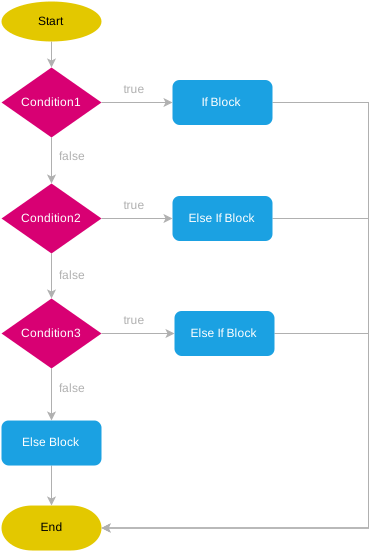
Simple Flow:
Condition → True path / False path


